
All About NMIMS Student Zone – Steps To Login From Web and Mobile App

- What Is NMIMS Student Zone?
- NMIMS Student Zone – Official Web & App Links
- Important Points to Know Before Logging In
- Steps to Log In to NMIMS Student Zone from a Web Browser


All About NMIMS Student Zone – Steps To Login From Web and Mobile App (2027 Guide)
📚 NMIMS Distance LearningWelcome to the complete guide on the NMIMS Student Zone — the official online learning portal for students enrolled in NMIMS Distance and Online programs. Whether you are a new admit trying to log in for the first time or an existing student looking for guidance on live lectures, assignments, exams, or the mobile app — this guide covers everything in detail.
NMIMS (Narsee Monjee Institute of Management Studies) is one of India's most reputed private universities, known for its quality management and business education. Its distance arm — NMIMS Global Access School for Continuing Education (NGASCE), now operating under the Centre for Distance and Online Education (CDOE) — uses the Student Zone as the single digital hub for all academic activities.
What Is NMIMS Student Zone?
The NMIMS Student Zone is the university's dedicated digital learning management system (LMS) — a secure, centralised portal where enrolled distance and online students access everything related to their academic journey.
Backed by over 30 years of academic legacy and state-of-the-art learning technology, the portal ensures that distance learners receive an experience comparable to on-campus study. From the moment you enrol, the Student Zone becomes your classroom, library, exam desk, and support desk — all rolled into one.
NMIMS Student Zone – Official Web & App Links
There are two ways to access the NMIMS Student Zone: through your web browser or through the official mobile app. Both provide the same core features. Below are the official links:
🌐 Web Portal (Browser Access)
Open the following URL in Google Chrome (recommended) on your desktop or laptop:
🔗 NMIMS Student Zone Web Login:
https://studentzone-ngasce.nmims.edu/studentportal/authenticate
📱 Mobile App Links
NMIMS CDOE Student App
Free Download
NMIMS CDOE Student App
Free Download
Important Points to Know Before Logging In
Before you attempt to access the NMIMS Student Zone, make sure you understand how and when your account gets activated:
- Your Student Number is generated only after full payment (including any late fee, if applicable), successful submission and approval of all documents, and verification of your registered mobile number and email ID by NMIMS CDOE.
- Once your Student Number is generated, it takes 2–3 working days to activate your Student Zone and receive the login password.
- Your NMIMS Student Zone password will be sent to your registered email ID within 2 working days of Student Number generation.
- Your Student Number is also printed on your ID Card, which arrives along with your physical study materials (Welcome Kit).
- Professional Diploma students will not receive hard copies of study materials — all materials are digital only.
- The Welcome Kit contains your Identity Card, Welcome Letter, and Undertaking Form.
- When logging in for the first time, you will be asked to change your password and complete your profile — this is mandatory.
- Do not delete the university number from your contacts — you will miss important SMS notifications.
Steps to Log In to NMIMS Student Zone from a Web Browser
Follow these step-by-step instructions to log in to the NMIMS Student Zone on your computer or laptop. Google Chrome is strongly recommended for the best experience.
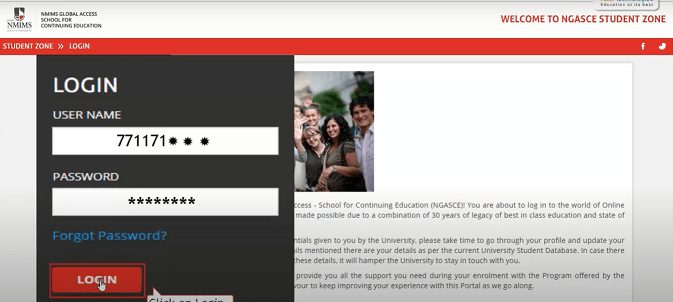
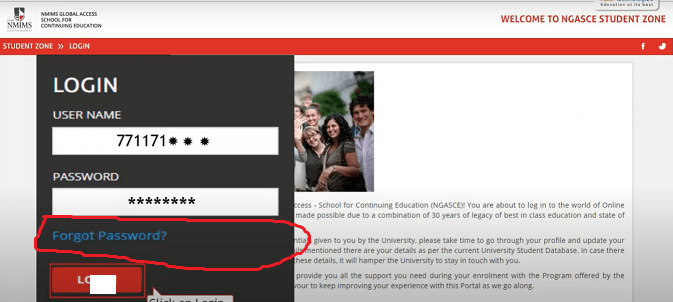
- Open your browser and go to: https://studentzone-ngasce.nmims.edu/studentportal/authenticate
- Enter your Student Number as the User ID (this is the unique number sent to your email and printed on your ID card).
- Enter your Password (the one sent to your registered email; first-time users may use "init@123" if no specific password was shared).
- Click the Login button to proceed.
- On your first login, you will be prompted to change your password and update your profile. Complete this step — it is mandatory.
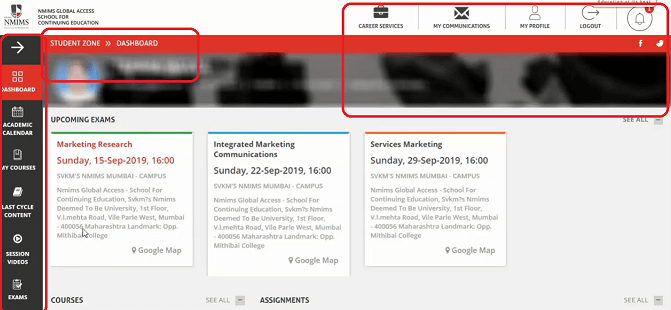
Once logged in, the Student Zone Dashboard will appear. It gives you a quick overview of your academic calendar shortcuts, pending assignments, upcoming lectures, and important notifications from the university.
Steps to Reset Your NMIMS Student Zone Password
If you have not received your password, or if you have forgotten it, follow these steps to reset it:
- Go to the login page: https://studentzone-ngasce.nmims.edu
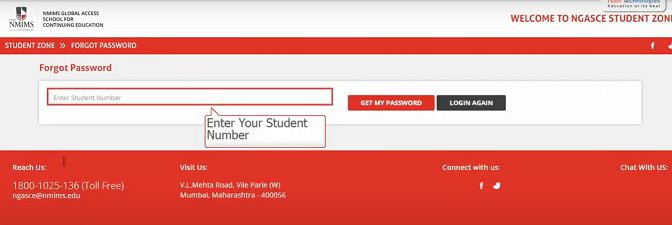
- Click on the "Forgot Password" link below the login form.
- Enter your Student Number in the field provided.
- Click "Get My Password" — the new password will be sent to your registered email ID within a few minutes.
- Check your inbox (and spam folder) for an email from NMIMS CDOE. Use the new password to log in.
How to Access Live Lectures & Academic Calendar
Live lectures are one of the most valuable features of the NMIMS Student Zone. Here is how to access and attend them:
- After logging in, click on "Academic Calendar" from the left-side menu (not the shortcut on the dashboard — always use the menu option).
- The calendar will display your scheduled lectures by date and subject. It is updated one day before each lecture.
- On the day of the lecture, click on the subject name you wish to attend.
- You will see an "Attend Session" button on the right. Click it to join the live lecture.
- You must log in to the portal at least 60 minutes before the lecture start time.
- Download the Zoom extension or app when prompted — NMIMS live sessions run on Zoom.
- The process is the same on both the web browser and the mobile app.
How to View Recorded Lectures & Download E-Books
Missed a live session? You can access all recorded lectures and digital study materials through the portal:
- Log in to the Student Zone and click on "My Courses" from the navigation.
- You will see all your subject names displayed as blue boxes with sub-options like Resources, Q&A, Forum, etc.
- Click on "Resources" for the subject you want to access.
- From the drop-down filter:
- Select PDF for e-Books and study material
- Select PPT for PowerPoint presentations
- Select Video for recorded lectures
- Alternatively, go to "Session Videos" for a chronological list of all recorded sessions.
How to Submit Assignments on NMIMS Student Zone
Assignments carry 30 marks (Internal Assessment) per subject and are mandatory. Here is the process:
- Log in to the Student Zone and navigate to the "Assignments" or "Assessments" section from the menu.
- Download the assignment question paper for each subject.
- Read the assignment guidelines carefully before writing your answers.
- Prepare your answers in the prescribed format (usually Word or PDF).
- Upload your completed assignment through the portal within the stipulated deadline.
About the NMIMS Distance Examination System
The NMIMS CDOE examination system is fully online and computer-based. Here's everything you need to know:
Exam Structure
| Component | Marks | Details |
|---|---|---|
| Internal Assessment (Assignments) | 30 Marks | Submitted online via Student Zone |
| Term-End Exam | 70 Marks | Online computer-based exam at designated centres |
| Total per Subject | 100 Marks | Both components are compulsory |
Exam Centres Across India
NMIMS has exam centres in over 27 cities, including: Ahmedabad, Bangalore, Delhi, Hyderabad, Indore, Kolkata, Mumbai, Navi Mumbai, Pune, Bhopal, Bhubaneswar, Chandigarh, Chennai, Gurugram, Guwahati, Jaipur, Lucknow, Nagpur, Nashik, New Delhi, Noida, Patna, Raipur, Rajkot, Surat, Thane, and Vadodara. Centres are subject to change per university notification.
Exam Registration & Hall Ticket
- Exam fee is ₹600 per subject; with 6 subjects per semester, the total per semester is ₹3,600.
- Register early to secure your preferred exam centre — seats fill up quickly.
- Hall tickets are available in your Student Zone under: Exams → Hall Ticket.
- Carry a printed copy of the hall ticket to the exam centre.
- Exams are typically held on Fridays, Saturdays, and Sundays across four weeks in June each year.
- If you miss the June exam, a Re-sit exam is held in September (at select locations and university centres only).
Demo Exam & Practice
- A Demo Exam is available in the Student Zone under the Exams section — use it to get comfortable with the format.
- Both MCQ and descriptive question types are used.
- No specific syllabus priorities — study the entire book content and attend all lectures.
How to Contact NMIMS Student Support
If you face any technical or academic issues on the Student Zone, here is how to get help:
- Go to: Student Zone → Student Support → Connect With Us
- Call the NMIMS CDOE helpline: 18001210018 (toll-free)
- Schedule a one-on-one guidance session by calling the helpline
- The faculty typically responds to queries raised via the portal within 24–48 hours
- For CDOE students: the support email is available in your enrollment welcome email
📞 Get Expert Guidance from CareerHike
Not sure which NMIMS program is right for you? Our education counsellors at CareerHike can help you compare programs, understand eligibility, and make the best decision for your career.
🌐 Explore NMIMS Distance MBA on CareerHike
📧 Contact us at: info@careerhike.in
Important Academic Dates – NMIMS CDOE (2027 Indicative)
| Event | Indicative Timeline |
|---|---|
| Admission Session | January / July each year |
| Assignment Questions Uploaded | 3rd week of September (post-session) |
| Assignment Submission Deadline | As notified on the portal |
| Exam Registration Window Opens | 2nd week of May (approx.) |
| Hall Ticket Availability | Last week of May (Student Zone → Exams → Hall Ticket) |
| Term-End Exams | Four weeks of June (Fri/Sat/Sun, flexible dates) |
| Re-sit Exams | September (select centres only) |
🎓 Thinking about pursuing an NMIMS Distance MBA or other programs?
Get Complete NMIMS MBA Details on CareerHike →Frequently Asked Questions – NMIMS Student Zone
The official web login URL is https://studentzone-ngasce.nmims.edu/studentportal/authenticate. Use Google Chrome for the best experience.
Your Student Number is generated after full fee payment and document verification. Once the number is generated, it takes 2–3 working days to receive your password on your registered email.
Click on "Forgot Password" on the login page, enter your Student Number, and click "Get My Password." The password will be sent to your registered email. If the issue persists, call 18001210018.
No. Downloads are currently disabled on the web portal. You can only view content online. To download lectures or e-books for offline access, use the NMIMS CDOE Mobile App (Android or iOS).
Android users: Google Play Store | iOS users: Apple App Store. Both are free.
The exam fee is ₹600 per subject. With 6 subjects per semester, the total comes to ₹3,600 per semester. This is paid at the time of exam registration.
Log in to the Student Zone and go to: Exams → Preview Hall Ticket. Download and take a printout to carry to the exam centre.
Yes. NMIMS is UGC-DEB approved and NAAC A++ accredited. The earlier UGC restrictions have been lifted and NMIMS holds Category I Autonomous University status. You can explore programs confidently at CareerHike's NMIMS Distance MBA page.
NMIMS has exam centres in 27+ cities including Mumbai, Delhi, Bangalore, Hyderabad, Kolkata, Chennai, Pune, Ahmedabad, Indore, Jaipur, and more. Book early to secure your preferred centre.
You can appear for a Re-sit exam in September. Note that re-sit exams are available only at selected locations and university regional offices — not all exam centres.
Conclusion
The NMIMS Student Zone is a comprehensive, well-structured digital platform that makes distance learning accessible, flexible, and efficient. From live and recorded lectures to exam registration, assignment submission, and student support — everything is available within a single login.
Whether you access it through the web portal at studentzone-ngasce.nmims.edu or via the NMIMS CDOE mobile app on Android or iOS, you have all the tools you need to complete your degree from one of India's most respected universities.
If you are still deciding whether NMIMS distance learning is the right choice for your career, or if you want guidance on the best program for your profile, our counsellors at CareerHike are here to help — for free.
🚀 Ready to take the next step with NMIMS Distance MBA?
Explore Programs on CareerHike →